

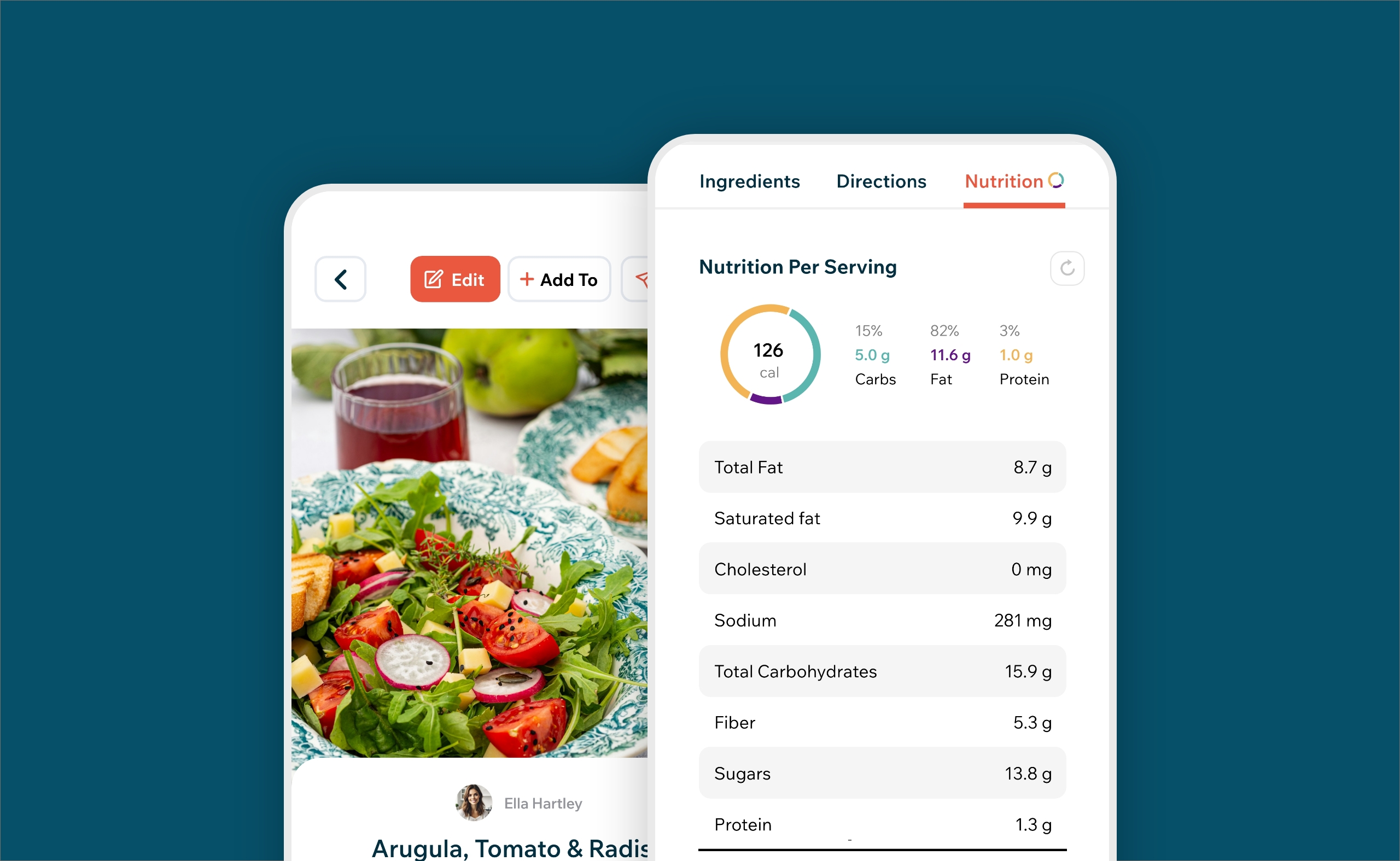
We’re excited to introduce Nutrition Estimates, a new beta feature in Recipe Cloud that makes it easier to understand the nutritional makeup of the recipes you save.
Nutrition is now available directly from the recipe screen on iPhone and iPad, alongside Ingredients and Directions, giving Recipe Cloud PLUS members a quick look at calories, macronutrients, and other nutritional information without leaving Recipe Cloud.
How nutrition estimates work
When you open the Nutrition tab, Recipe Cloud analyzes the recipe’s ingredient list and works to identify each individual ingredient, its quantity, and its unit of measurement.
Those ingredients are then matched with food and nutrient information from USDA FoodData Central, the U.S. Department of Agriculture’s comprehensive food composition database.
For example, if a recipe contains ingredients such as flour, butter, eggs, and milk, Recipe Cloud works through each ingredient individually, converts the listed quantities into usable amounts, matches them with appropriate foods in the USDA data, and combines those values to create an estimate for the complete recipe.
When a recipe includes the number of servings, Recipe Cloud can also calculate estimated nutritional values per serving.
What you'll see
Depending on the recipe and the available ingredient data, nutrition estimates may include Calories, Protein, Carbohydrates, Total Fat, Saturated Fat, Fiber, Sugars, Sodium, and Cholesterol.
You'll also see a visual breakdown of the recipe's calories from carbohydrates, fat, and protein.
If the recipe includes serving information, nutrition is shown per serving, along with the calorie total for the whole recipe.
Why we're calling it a beta
Recipes are rarely written like nutrition databases. An ingredient might say “a handful of spinach,” “one package of chicken,” “salt to taste,” “3–4 bananas,” or simply “olive oil.” Brands, preparation methods, ingredient substitutions, serving sizes, and even the way a recipe author writes an ingredient can all affect the calculation.
Recipe Cloud works to interpret as much of that information as possible, but some ingredients cannot be matched precisely. Nutrition estimates currently work best with recipes written in English, although metric measurements and many common UK and Australian ingredient names are supported.
When there isn't enough reliable ingredient information to create a useful estimate, Recipe Cloud may choose not to display a total rather than show a potentially misleading result. For that reason, nutrition information should always be considered an estimate rather than laboratory-measured data.
Launching the feature as a beta gives us the opportunity to continue improving ingredient matching and calculation quality as we see how nutrition performs across the wide variety of recipes people save to Recipe Cloud.
Nutrition for the recipes you already have
One of the things we’re most excited about is that Nutrition Estimates aren't limited to newly created recipes. You can open an existing recipe in your Recipe Cloud collection and select the Nutrition tab to calculate an estimate using the ingredients already saved with the recipe.
That means the recipe collection you've already built can become more useful without requiring you to re-enter your recipes or manually look up nutrition elsewhere. If you make changes to a recipe's ingredients, you can refresh the Nutrition Calculator to create a new estimate.
Nutrition calculations happen on your device and are not currently saved to the recipe or synced between devices.
Available with Recipe Cloud PLUS
Nutrition Estimates are included with Recipe Cloud PLUS and are available on iPhone and iPad beginning with Recipe Cloud 4.3.0.
We’re just getting started with nutrition in Recipe Cloud, and we’ll continue improving the experience as the beta evolves. Update to Recipe Cloud 4.3.0 and open the Nutrition tab on any recipe to try it.



0 Comments