
Now Available for iPhone and iPad
Introducing the All-New
Recipe Cloud App
Welcome to the next evolution of Recipe Cloud! Recipe Cloud 4.0 is here, bringing new features and improvements designed to make your time in the kitchen more enjoyable and efficient. Whether you’re a seasoned chef or just starting out, Recipe Cloud makes it easier to cook, plan, and organize.
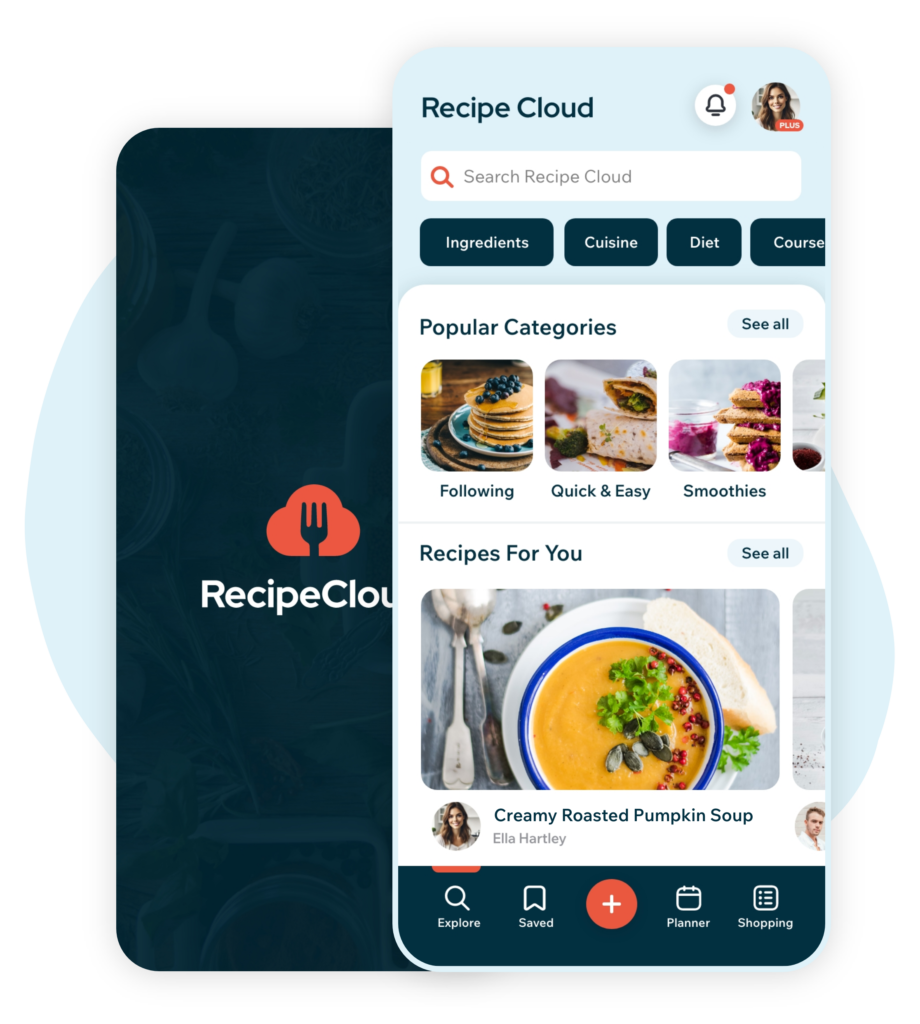
Improved User Experience
Recipe Cloud 4.0 introduces a fresh, intuitive design that makes it easier to access your recipes, discover new dishes, plan meals, and shop with ease. With streamlined navigation and faster performance, this update ensures a smoother, more reliable experience from start to finish.
All-New iPhone and iPad App
A fully redesigned experience that prioritizes what you use most. With improved navigation that makes it easy to find, save, import, plan, and shop with your favorite recipes.
Intuitive User Interface
Every element of the app has been thoughtfully crafted for a natural, effortless feel. Enjoy a seamless experience, whether you’re cooking at home or planning meals on the go.
Built for Speed and Reliability
Enhanced performance and backend upgrades make Recipe Cloud 4.0 faster and more dependable, delivering quicker load times and smoother transitions throughout the app.
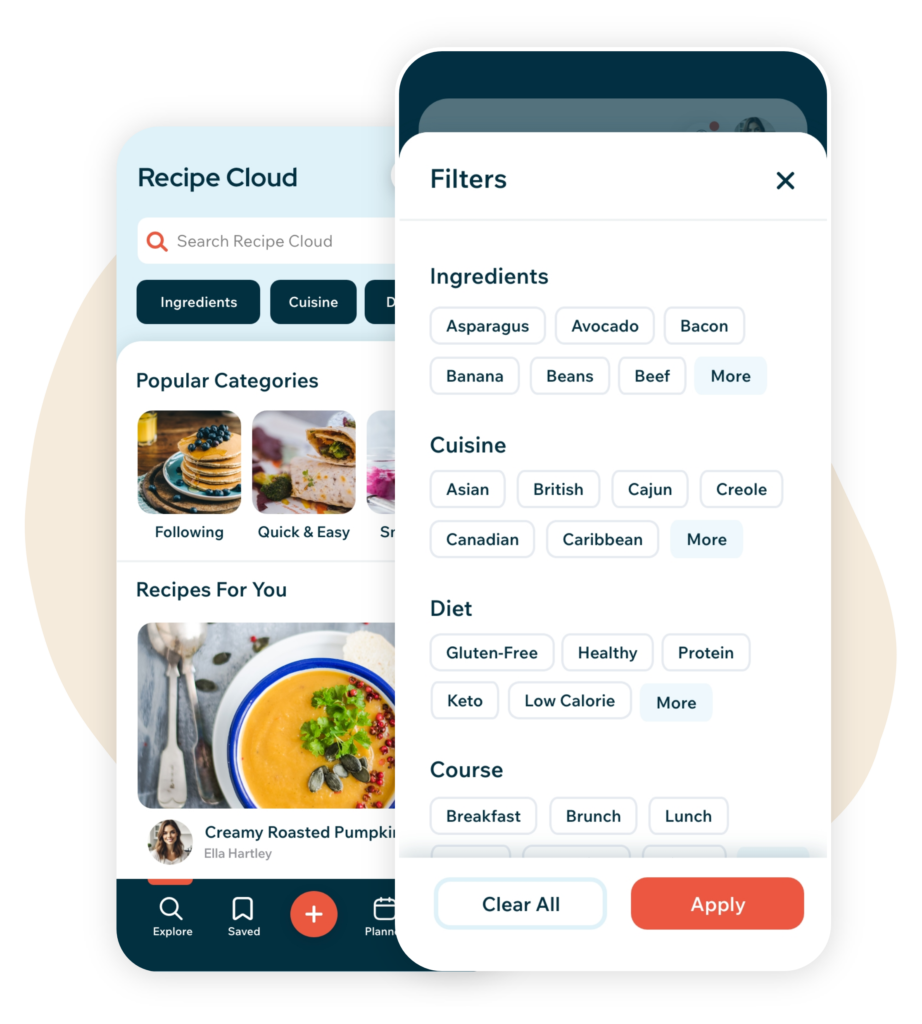
New Ways to Explore
Discover recipes like never before with powerful new tools and tailored recommendations. The all-new Explore screen, along with advanced search and filtering options, makes it easy to find recipes that match your tastes and preferences. Customize your experience further by setting user preferences for a truly personalized journey.
All-New Explore Screen
Find fresh recipe inspiration with our redesigned Explore screen. Search, filter, and browse by category, then discover personalized recommendations, the latest recipes from people you follow, popular recipes, new and noteworthy finds, and featured tastemakers.
Advanced Search and Filter
Quickly find exactly what you’re craving with powerful search and filter options. Search by ingredients, dietary preferences, cuisine, cooking technique and more for a highly personalized discovery experience.
User Preferences
Set your favorite cuisines, dietary preferences, and cooking skill level. Receive customized recipe recommendations that align with your culinary interests.
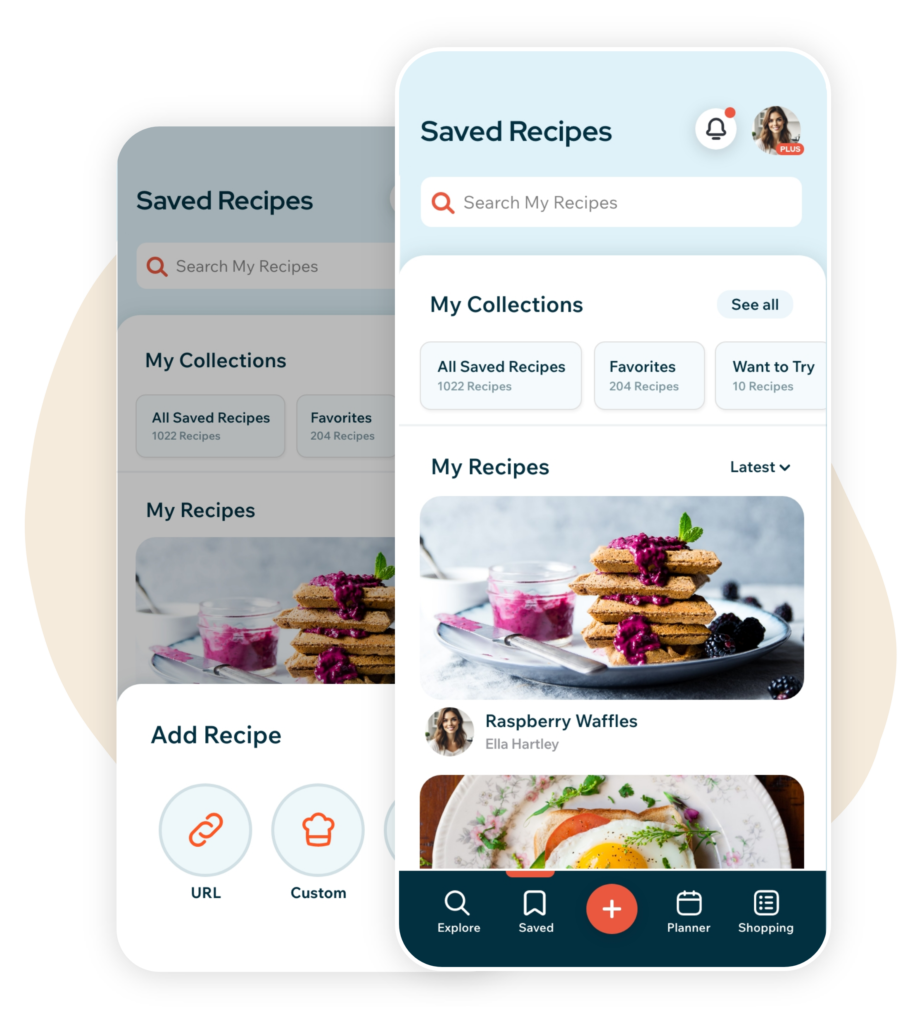
Import, Save and Organize
Recipe Cloud 4.0 makes it easier to save, organize, and rediscover your favorite recipes. Import from websites and social platforms, create custom recipes, save recipes from the community, and use “I Made This” to rate what you’ve tried.
Import Recipes From Anywhere
The new Recipe Cloud share extension makes saving recipes faster and more flexible. Import recipes from food blogs and recipe websites, or save recipes shared on Instagram, TikTok, and YouTube directly to your Recipe Cloud library.
Improved Recipe Organization
We’ve streamlined the way you organize and access your saved recipes. Updated collection workflows make it easier to add recipes to collections, browse your collections, and quickly find the recipes you’re looking for.
Rate Your Recipes
Made a recipe? Tap “I Made This” to give it a thumbs up or thumbs down. Your rating adds a badge to the recipe, making it easy to remember what you enjoyed. You can also sort your saved recipes by Highly Rated to quickly find your favorites.
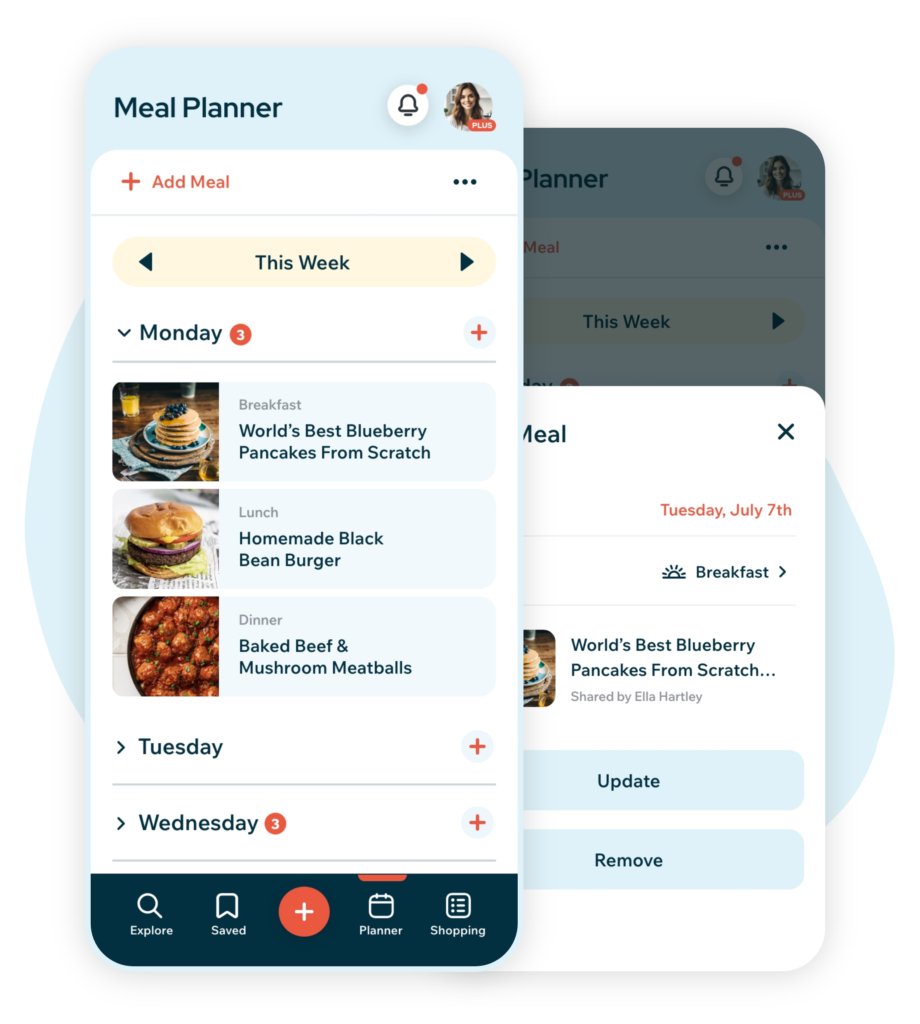
Meal Planning, Made Easy
The redesigned meal planner offers powerful new tools to plan weekly meals with ease. Generate shopping lists directly from your meal plan and enjoy optimized features that simplify grocery planning and list management, making meal prep more efficient than ever.
Plan Your Week
Plan your week with a redesigned meal planner built for iPhone and iPad. Add recipes to specific days, organize breakfast, lunch, dinner, and snacks, and keep your upcoming meals easier to see, adjust, and manage.
Create Shopping List From Your Plan
Turn your meal plan into a shopping list in just a few taps. Recipe Cloud pulls ingredients from your planned recipes into one organized list, so you can shop more efficiently and check items off as you go.
Share Your Meal Plan
Share your meal plan by text or email so everyone knows what’s for dinner. It’s an easy way to keep family, roommates, or anyone helping with meals on the same page.
Shopping and Savings
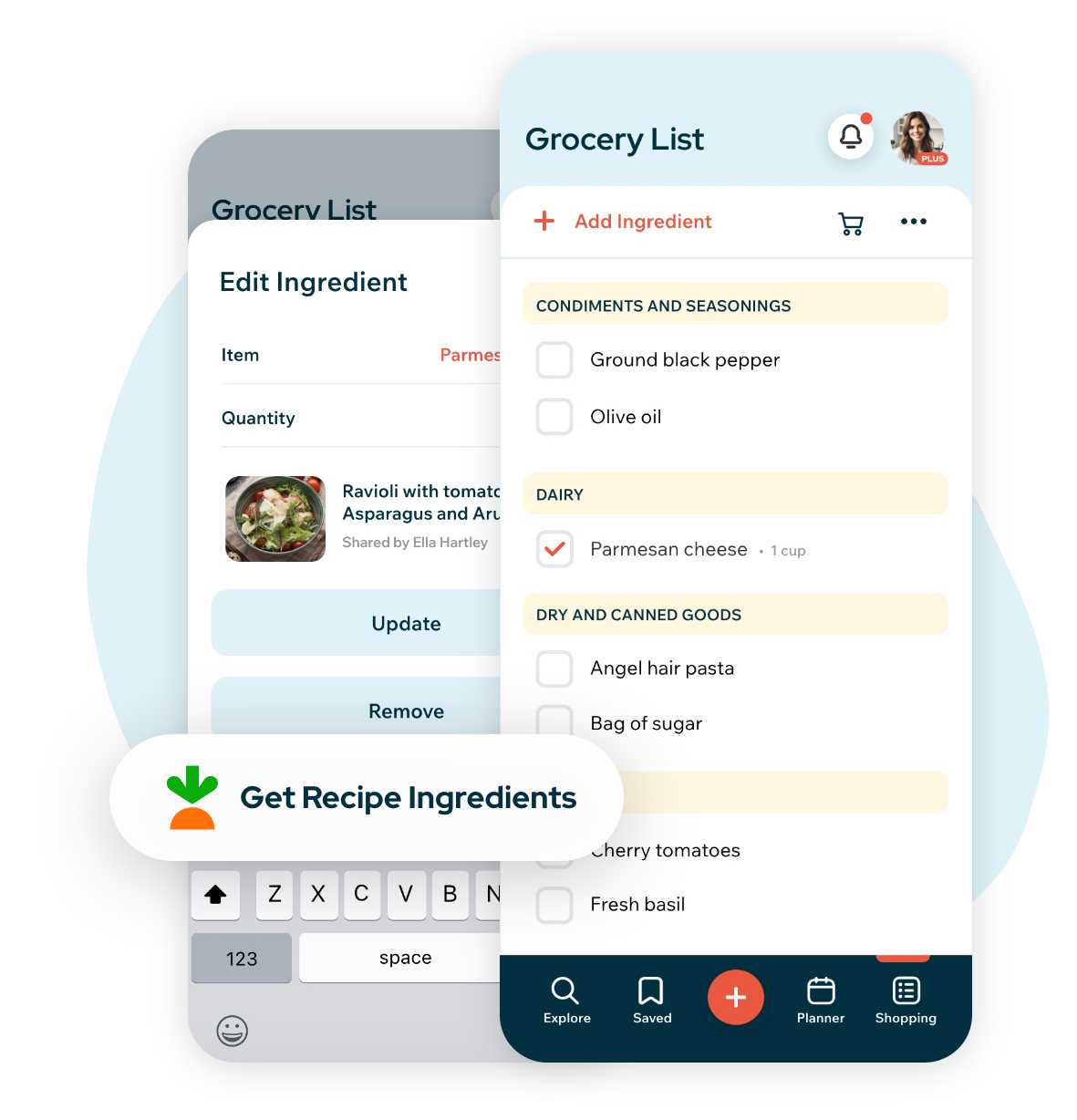
Recipe Cloud 4.0 makes grocery shopping easier with smarter shopping list tools built around the way you shop. Create organized lists from your recipes and meal plans, add custom items, automatically group ingredients by shopping aisle, share lists with others, and shop for recipe ingredients with Instacart®.
All-New Shopping List
Build smarter grocery lists from your saved recipes, meal plans, or your own custom items. Recipe Cloud automatically organizes ingredients by shopping aisle, making it easier to move through the store and check things off as you go.
Get Recipe Ingredients with Instacart®
Recipe Cloud 4.0 makes it easier to shop for the ingredients you need from recipes and shopping lists. Start from a recipe or shopping list, then review your ingredients and choose from available delivery or pickup options through Instacart®. This shopping option is currently available to users in the United States and Canada.
Share Your List
Share your shopping list by text or email so family, friends, or anyone helping with groceries can easily see what you need. It’s a simple way to make shopping easier, whether you’re at the store or planning ahead.
And so much more ...
Access Anywhere
Keep your recipes, collections, meal plans, and shopping lists synced across iPhone, iPad, and the web.
Recipe Cloud PLUS
Save unlimited recipes, enjoy an ad-free experience, and unlock more tools for planning and organizing.
Help and Tutorials
Find answers, tutorials, and support resources in the Recipe Cloud Knowledge Base.
Frequently Asked Questions
Is Recipe Cloud 4.0 free?
Yes. Recipe Cloud is free to download and use, with optional Recipe Cloud PLUS plans available for users who want unlimited recipe saving, an ad-free experience, and additional premium features.
What’s new in Recipe Cloud 4.0?
Recipe Cloud 4.0 introduces a completely redesigned app for iPhone and iPad, with improved recipe importing, easier organization, personalized recipe discovery, meal planning, smarter shopping tools, and the new “I Made This” rating feature.
Where can I save recipes from, and how does it work?
You can save recipes from food blogs and recipe websites, as well as social platforms including Instagram, TikTok, and YouTube. Use the Recipe Cloud share extension to send a recipe directly to your library, create your own custom recipes, or save recipes shared by the Recipe Cloud community.
Can I use Recipe Cloud on iPhone, iPad, and the web?
Yes. Recipe Cloud 4.0 is available for compatible iPhones and iPads running iOS or iPadOS 16.4 or later. You can also access Recipe Cloud from a computer or mobile device using the web app. Your recipes, collections, meal plans, and shopping lists stay synced through your Recipe Cloud account.
What is included with Recipe Cloud PLUS?
Recipe Cloud PLUS includes unlimited recipe saving, an ad-free experience, and additional tools to help you organize recipes, plan meals, and get more from Recipe Cloud across your supported devices.
Have a feature idea or feedback?
We’d love to hear from you. Share your ideas, feedback, or suggestions through our contact form and help shape the future of Recipe Cloud.

Join the list for Updates
Sign up for product updates, helpful tips and tricks, new feature announcements, special offers, and more from Recipe Cloud.